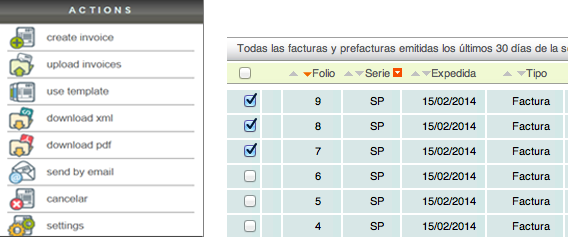
Download electronic invoice
Download the PDF (printed representation)

To download your receipt, simply click the "Download PDF" button located in the "Actions" menu.
When you click the button, the system will present you with the "CFDI Impreso" option, which refers to the system's default printed format. You will also have another download option for the primary sector format, commonly called "CFDI_Sector_Primario".

Download the XML file

You can also download the XML file of your receipt. To do this, simply click the "Download XML" button located in the "Actions" menu.
It is recommended that you do not open these types of files, as doing so with an unsuitable editor can damage the file structure and corrupt it, causing problems during validation with the SAT (Mexican Tax Administration Service).
For this reason, we recommend saving the file electronically.
Send by e-mail

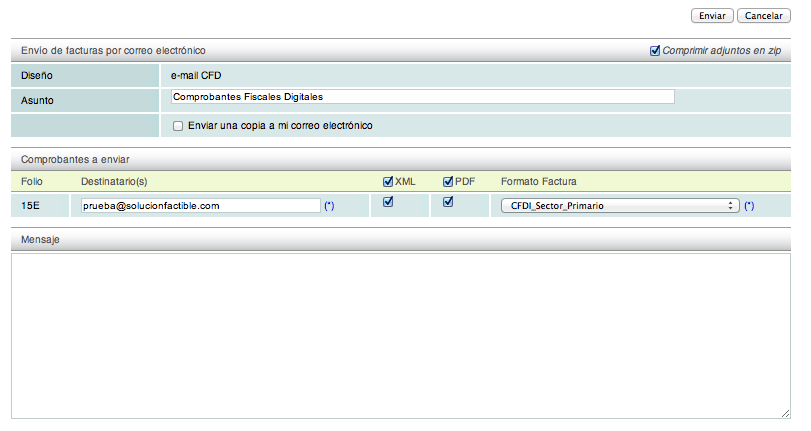
The system also allows you to send your electronic receipt without downloading it to your computer, as it is sent directly from the invoicing system.
To send the receipt, select the "Send by email" option in the "Actions" menu. First, enter the recipient's email address and then write your message.
Once you have finished, click the "Enviar" button.
Download and bulk sending of e-documents
If you need to download or send multiple e-documents, you can select them and use any of the options described above. This way, only the selected receipts will be downloaded/sent.