
1.4. Digital seal or electronic signature
The digital seal is the result of signing the original chain obtained from the electronic invoice, encoded in base64. This chain contains coded information associated with the issuer of the electronic document (or any other CFD) and the invoice data itself. Since the seal is generated using the invoice data, any changes to the invoice will be noticeable, resulting in a different seal or signature. This digital seal will allow you to verify the authorship of the digital tax receipt (CFD) you issue, so your clients will know that you were the author of that e-document.
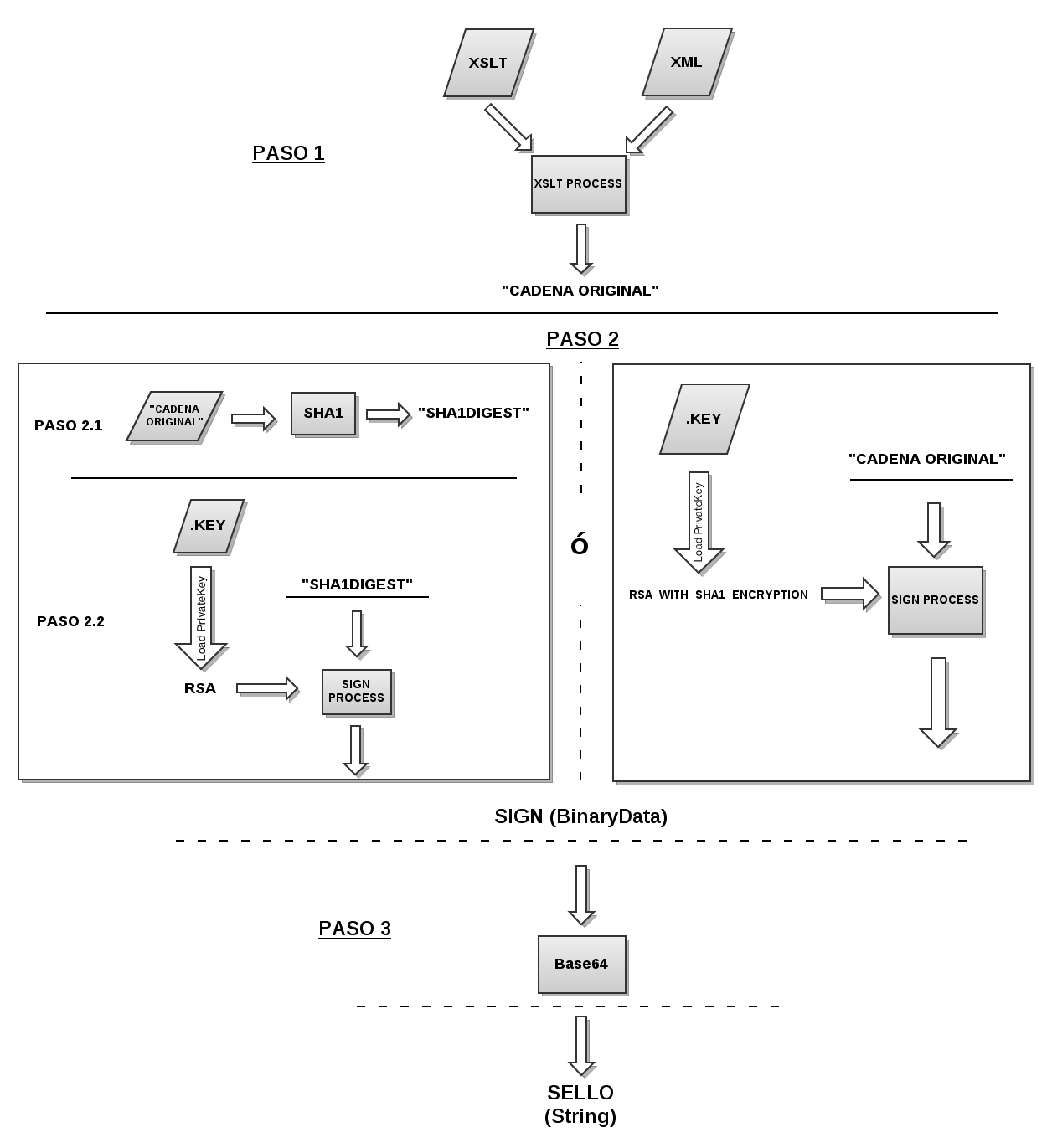
Steps and elements needed to generate the Seal
- 1.- Obtain the "Original chain" from the CFD. More.
- 2.- Signing "Original Chain" can be done in two separate steps or in one single step. More.
- 3.- The signature result is in binary, therefore the last step is to encode it in base64. More.
- The result of applying base64 to the signature is the Seal or Digital Signature.
IMPORTANT: there are libraries that perform SHA256 encryption and RSA signing in the same step, as shown in the DIAGRAM.
Example of a digital seal:
Step 1.- Original chain
The original chain of the electronic document is obtained. CadenaOriginal (original chain).
Step 2.- Sign Original Chain
Elements required for signing or sealing electronic documents:
- .CER del CSD o FIEL (e.firma)
- .KEY del CSD o FIEL (e.firma)
- Pass del .KEY CSD o FIEL (e.firma)
- "Cadena Original"
This process can be carried out in 2 different ways:
- A) Sign and encode the original chain in a single step (some libraries handle it this way).
- B) First encode the original chain and then sign it with RSA.
A) First step
An object is initialized that handles the RSA signature algorithm with SHA-256 input digest. It is usually called with some variations such as: "SHA256withRSA".
b) Second step
1. SHA-256 - Calculating the SHA-256 digest (it is a digest or digest algorithm) of the original chain will produce a 160-bit (20-byte) digest output of a message that can have a maximum size of 264 bits; this is generally a binary sequence of bytes but can be represented in hexadecimal as a chain of characters.
Example:
Note: this is just a representation; internally it should be treated as a 20-byte array.
To check the SHA-256, you can use openssl and xsltproc from the command line.
- Linux: The default tools are already installed.
- Windows:
- The tools needed to obtain the original chain are described in the Original Chain Topic
- To encode with SHA-256: openssl
To run these tools from the command line, you need to update the PATH environment variable with the location of the bin directory for each necessary tool, or extract the files from the bin directory of each tool and place them in the same location, then simply add that path to the PATH.
C:\> PATH=%PATH%;C:\xsltproc_bin_files;C:\OpenSSL-Win32\bin
Finally, execute the command:
xsltproc cadenaoriginal_3_3.xslt Factura_BS.xml | openssl dgst -sha256
2. RSA - Programmatically speaking, the .KEY file of the CSD or FIEL is loaded into an object that handles the RSA algorithm; once this is done, only the bytes of the SHA256 digest are signed.
Step 3.- Apply Base64
The result of signing the "original chain" with RSA is binary, therefore it has to be encoded in base64 in order to be able to put it in the "seal" attribute of the electronic invoice.
Process diagram for obtaining the Seal
Tools
Digital seal generator
Digital seal generator tool - This tool obtains the original chain of the electronic document (file with XML extension) and the signature with the certificate, the result is the seal in base64.
Output data:- Seal.
- Original chain.
- Digestion corresponding to the CFD version represented in hexadecimal applied to the original chain.
Digital seal verifier (signature verifier)
This tool loads an electronic document and validates the signature. If the .CER file used to generate the signature is included, it will attempt to validate using that file. If the .CER file is not included, but the CFD contains the "certificate" attribute and is not empty, it will validate using that attribute.
Note: The "Certificate" file can be omitted if it is found in the XML.
